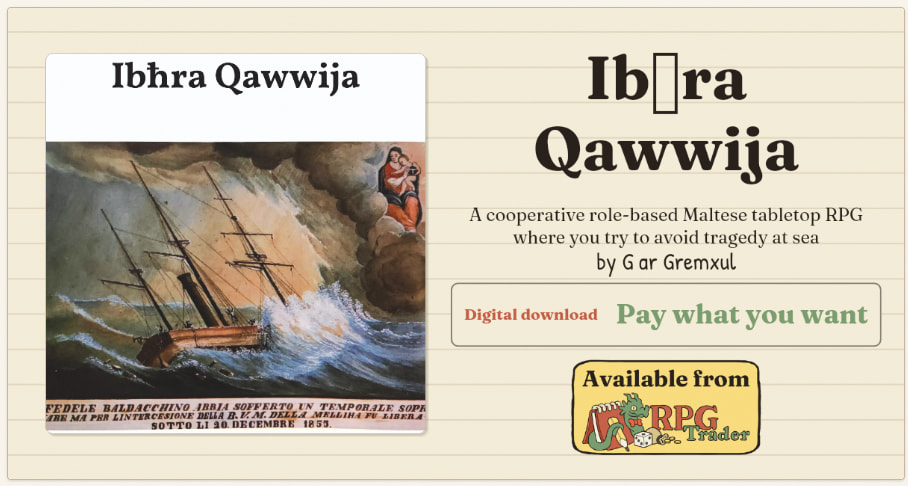
I’d like to ask for support for the Maltese language in a few different places on the website.
Maltese is missing when choosing languages for products (at the moment, I’m restricted to selecting Other Languages).
Maltese characters are not supported in the social media preview. The image below shows a box instead of the ħ character, and the ħ character is missing entirely from the author’s name (which should be Għar Gremxul).
It would also be convenient if the URLs created when using these characters defaulted to the non-diacritic versions. Examples of this issue can be seen below, as well as in the URL to my support profile:
We have added Maltese as a language option and updated all of your products to use it - you can always edit them further, but now they are showing up when filtering to Maltese: https://rpg-trader.com/products?language=Maltese
URLs now encode Maltese (and more) characters correctly. We already did this for many characters, and have expanded it to support even more now. Old URLs that don’t show the characters will automatically redirect to the fixed URLs, so you don’t have to worry about that.
The text in the social media images is now fixed so that special characters will show correctly, instead of displaying as boxes or being left out entirely. These all now work in the title, subtitle, and creator name on those cards.
That should cover all the areas you reported - let me know if it’s all working as you expect now!
Are there any other areas where you feel we might not be accommodating Maltese characters correctly?
I just noticed something. The solution seems to work for the social media image for Ibħra Qawwija (both Ibħra Qawwija and Għar Gremxul are rendered correctly). But this doesn’t seem to have updated properly for Saġġara for example, or for Rewwixta.
I’ve cleared my browser cache, but maybe this is something I just need to wait for to be rolled out completely on the server side?
All of your products look fine to me - the social media images are filled correctly, and the text on the page looks correct too. It could be a cache issue. If you’re seeing the same social media image come up on a platform you previously shared it on (Discord, Bluesky, wherever) then that platform will have the old image cached and that can take a long time to clear.
Where are you seeing the incorrect text in the images?
I saw this in the product dashboard, which means downloading the social media image remains incorrect and the previews for different social media sites are also incorrect.
Loading the tab in a private window or in a different browser doesn’t seem to fix things (I used both Vivaldi and Chrome). I figured it was a cache issue, so I’m happy to wait until it clears!